This article explains how to transfer ownership of a Cintoo project from one Project Owner to another.
Permissions: only users with Account Owner, Administrator or Project Owner role can transfer project ownership to a user with Project Manager role.
By default, a user who originally created the project will be listed as Project Owner at the top of project's Members tab.

1. Navigate to Administration from burger menu on the top right > Subscriptions page.

2. Choose the plan under Plans on the left side where the project is listed.
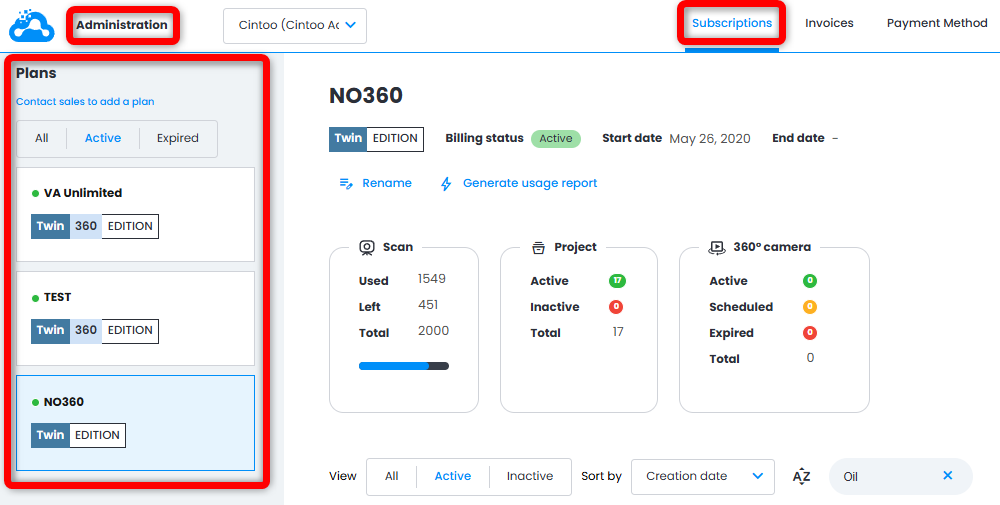
3. Find the project to be moved (use filters or Search bar if needed) and click Edit project.
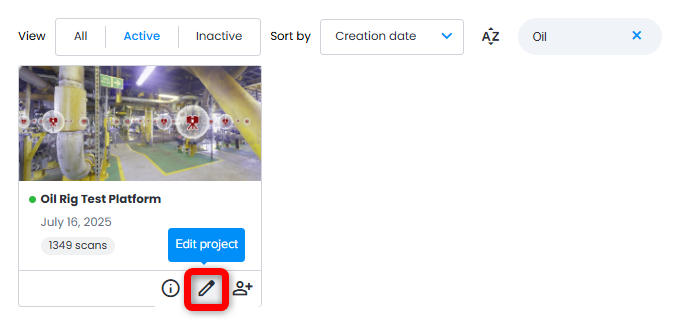
4. In Edit project window, click drop-down menu under Owner, and select a Cintoo Project Manager from the list.
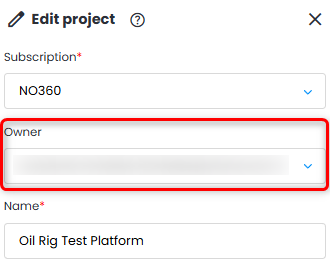
Only members who have been invited as Project Managers under Cintoo account will be displayed in Owner drop-down menu. For more information about assigning Project Managers, see this article: Setting Project Managers.
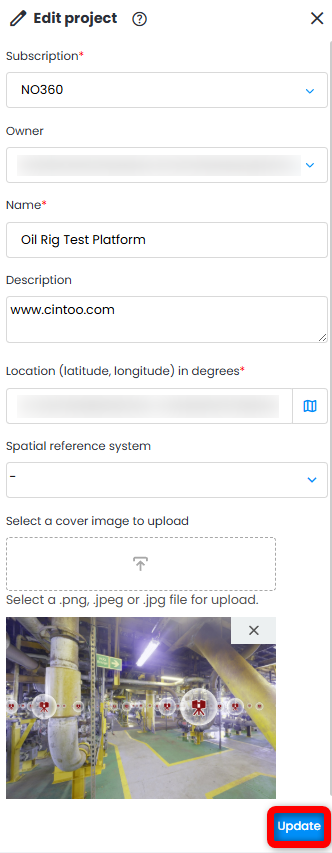
Click Update to transfer project ownership to the selected Cintoo Project Manager.
Was this article helpful?
That’s Great!
Thank you for your feedback
Sorry! We couldn't be helpful
Thank you for your feedback
Feedback sent
We appreciate your effort and will try to fix the article